默认、具名与作用域插槽
插槽让父组件定义子组件某个区域的内容;内容使用父组件的作用域,子组件需要额外提供的数据通过 slot props 传递。
默认插槽与具名插槽
<!-- Card.vue -->
<template>
  <section>
    <header><slot name="header">默认标题</slot></header>
    <slot>默认内容</slot>
  </section>
</template>
<Card>
  <template #header>自定义标题</template>
  <p>默认插槽内容</p>
</Card>
#header 是 v-slot:header 的简写,未提供内容时使用 slot 内的默认内容。Vue 2.6+ 与 Vue 3 均支持 v-slot,旧版 slot="header" 语法不用于 Vue 3。
作用域插槽:自定义表格单元格
<!-- CustomTable.vue -->
<script setup>
defineProps({ tableData: { type: Array, required: true } });
</script>

<template>
  <table>
    <thead>
      <tr><th>姓名</th><th>年龄</th><th>职业</th><th v-if="$slots.action">操作</th></tr>
    </thead>
    <tbody>
      <tr v-for="(row, index) in tableData" :key="row.id">
        <td><slot :row="row" :index="index">{{ row.name }}</slot></td>
        <td>{{ row.age }}</td>
        <td>{{ row.job }}</td>
        <td v-if="$slots.action"><slot name="action" :row="row" :index="index" /></td>
      </tr>
    </tbody>
  </table>
</template>

<style scoped>
table { border-collapse: collapse; }
th, td { border: 1px solid #999; padding: 8px 12px; text-align: left; }
</style>
<!-- Parent.vue -->
<script setup>
import { ref } from 'vue';
import CustomTable from './CustomTable.vue';

const users = ref([
  { id: 1, name: '张三', age: 25, job: '前端工程师' },
  { id: 2, name: '李四', age: 30, job: '后端工程师' }
]);
const edit = (row, index) => console.log('编辑', row, index);
const remove = row => { users.value = users.value.filter(user => user.id !== row.id); };
</script>

<template>
  <CustomTable :table-data="users">
    <template #default="{ row, index }"><strong>{{ index + 1 }}. {{ row.name }}</strong></template>
    <template #action="{ row, index }">
      <button @click="edit(row, index)">编辑</button>
      <button @click="remove(row)">删除</button>
    </template>
  </CustomTable>
</template>
row 与 index 由子组件的 slot props 提供;操作方法来自父组件。默认插槽与具名插槽同时有作用域参数时,应分别用 <template #default> 与 <template #action> 声明。
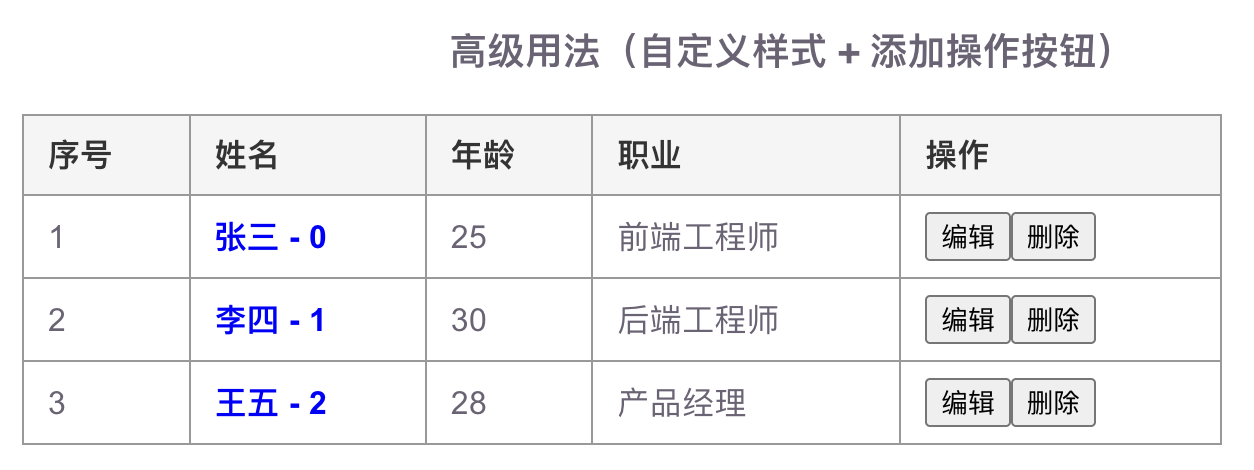
在 JavaScript 中读取插槽可用 useSlots。